The Essential 8 is a foundational cyber security baseline from the Australian Cyber Security Centre (ACSC), part of the Australian Signals Directorate (ASD), designed to help organisations reduce common compromise paths across internet-connected IT networks.
Maybe you spotted the Essential 8 in a tender document. Maybe your cyber insurer mentioned it, or a bigger client slipped it into a supplier questionnaire. Whatever brought you here, behind the name sits a fairly specific set of controls the Australian government wants businesses running to stop the attacks they cop most often.
So today, in this guide, we will explain what the Essential 8 is, walk through each of its eight strategies, and break down the four maturity levels.
Let’s start with the framework itself.
What is the Essential Eight?
The Essential Eight is a set of eight prioritised mitigation strategies developed by ASD to help organisations protect internet-connected IT networks. The eight strategies are:
- Application control
- Patch applications
- Configure Microsoft Office macro settings
- User application hardening
- Restrict administrative privileges
- Patch operating systems
- Multi-factor authentication
- Regular backups.
ASD created the Essential Eight from a longer list of strategies called the Strategies to Mitigate Cyber Security Incidents. These eight strategies were chosen because they stop or reduce most of the cyber incidents that ASD sees.
The framework is built mainly around Microsoft Windows networks connected to the internet, which is what most Australian businesses run on. No set of controls guarantees total protection, of course. What the Essential Eight does is raise the cost and effort an attacker needs to get in.
The 3 Objectives Behind the Essential Eight
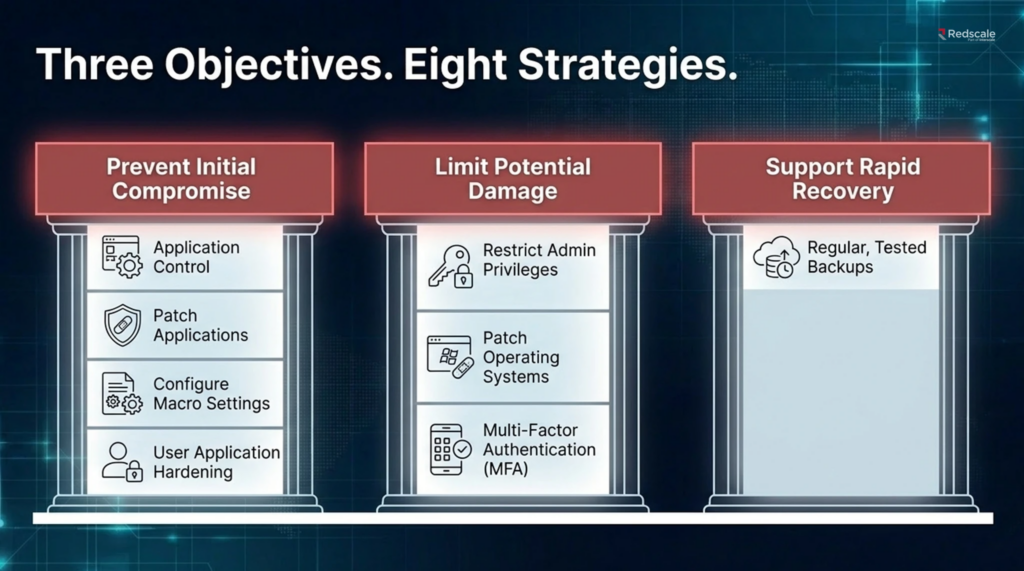
The Essential Eight has three practical objectives: prevent compromise, limit damage, and support recovery.
The first objective is to make initial compromise harder. Four strategies back this goal: application control, patching applications, configuring Microsoft Office macro settings, and user application hardening.
The second objective is to limit damage if one control fails. Three strategies handle this: restricting administrative privileges, patching operating systems, and multi-factor authentication.
The third objective is recovery. Regular backups are the lone strategy here, and they are what let you restore data and get back to work after an incident such as ransomware.
The controls work best together. MFA without privilege control still leaves risk. Backups without restoration testing still leave doubt.
Essential 8 Mitigation Strategies explained
The Essential 8 mitigation strategies are eight specific controls that work together to prevent, contain, and recover from cyber incidents. Here is each one, with what it does and why it matters for a small business.
Application Control
Application control allows only approved applications, scripts, installers, and code to run. Rather than trying to detect every bad program, the business starts with an approved list and blocks what is not approved.
For smaller SaaS and digital teams, risk can appear through unmanaged installers, browser extensions, or shadow tools. The buyer check is whether approved applications, software approvals, and exceptions are clearly recorded.
Patch Applications
Patch applications mean keeping business software updated so known vulnerabilities are fixed before attackers can exploit them. This includes browsers, PDF tools, collaboration tools, email clients, and office software.
The issue is whether the business can see exposed devices, prioritise urgent updates, and remediate failures. The buyer question is who reviews failed patches and escalates high-risk exceptions.
Configure Microsoft Office Macro Settings
Configuring Microsoft Office macro settings reduces the risk of malicious macros running through documents, spreadsheets, or email attachments. Some finance or reporting teams may have legitimate macro use, but that does not justify open macro use for everyone.
The practical decision is to separate genuine dependency from habit. Risky macro processes need ownership and a safer operating path where possible.
User Application Hardening
User application hardening reduces risky settings in everyday tools such as browsers, PDF software, office applications, plug-ins, and scripting features. Many attacks begin inside tools staff already trust.
For Australian small businesses, the balance is usability. Hardening should reduce unnecessary attack surface without making basic work painful. High-risk settings should be centrally controlled.
Restrict Administrative Privileges
Restricting administrative privileges limits who can make high-impact changes to systems, devices, and business applications. This reduces the chance that one compromised account becomes a full environment compromise.
Admin rights are often over-granted because they make support faster. The problem arrives later, when no one remembers why access was granted. A good access process asks: who has admin access, why do they have it? and when will it be reviewed?’
Patch Operating Systems
Patching operating systems means keeping workstations, servers, mobile devices, and relevant infrastructure updated. This reduces exposure to known vulnerabilities in the platforms the business depends on.
The practical challenge is visibility. Remote staff, old laptops, unmanaged devices, and unsupported systems can fall outside the patch process. The business needs to know what must be updated, replaced, isolated, or compensated.
Multi-factor Authentication
Multi-factor authentication requires users to prove identity with more than a password. It is especially important for email, remote access, finance systems, customer data platforms, and administrative accounts.
MFA is not a single completed task. Its strength depends on where it is enforced, which methods are allowed, and whether privileged accounts are protected first. Cyber insurance discussions often focus on MFA, even when they do not mention Essential Eight.
Regular Backups
Regular backups support recovery when data is encrypted, deleted, corrupted, or lost. The point is not only to create copies but also to prove that important systems can be restored.
A backup that has never been tested is an assumption. The useful check is whether backups are restricted, tested, and mapped to critical systems.
Essential 8 Maturity Levels Explained
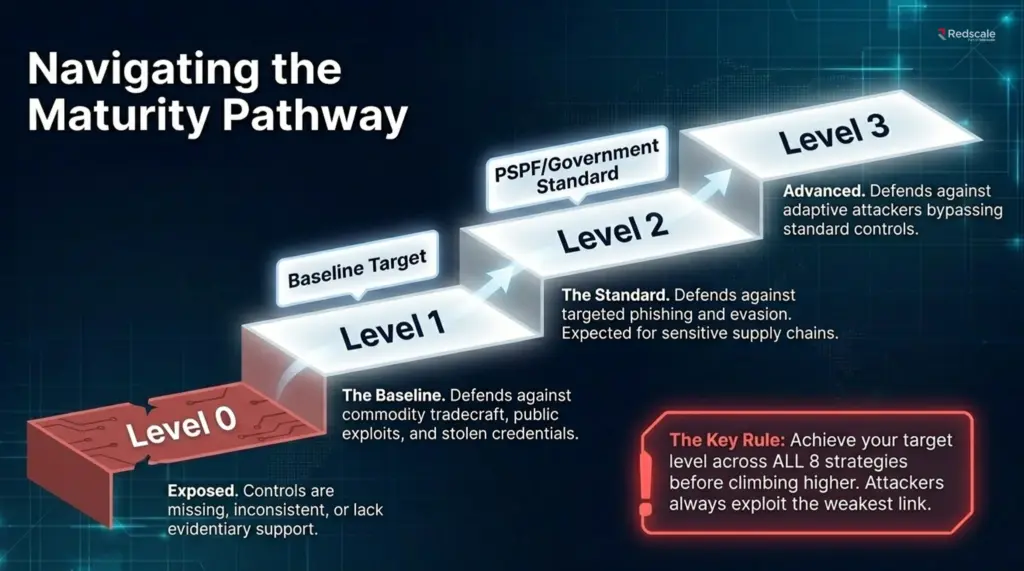
The Essential 8 maturity levels show how consistently your business has implemented all eight mitigation strategies, from Maturity Level Zero through to Maturity Level Three.
This Essential 8 maturity model helps you set a realistic target, understand the strength of your current controls, and explain your progress in a way that customers, insurers, or tender reviewers can understand.
One principle matters above the rest: reach your target level across all eight strategies before you climb higher. For example, a brilliant patching counts for little if MFA is missing because attackers always probe for the weakest link.
Maturity Level Zero
Maturity Level Zero means the organisation does not yet meet the requirements of Maturity Level One. Controls may exist in parts, but they are missing, inconsistent, or not supported by enough evidence.
This is common for businesses that have security activity but no formal Essential Eight control baseline. Treat Level Zero as the starting point for finding gaps, not as a maturity target.
Maturity Level One
Maturity Level One is the first target maturity level and is aimed at reducing common, lower-complexity attacks.
ASD describes Level One as addressing malicious actors using public exploits, stolen credentials, reused passwords, brute force, or guessed credentials.
For many small businesses, Level One is a sensible first target. It gives the business a baseline across identity, patching, privilege, applications, and backups.
Maturity Level One should not be dismissed as “just basic”, because many incidents still succeed through weak or partial controls.
Maturity Level Two
Maturity Level Two increases the expected consistency and strength of the controls. It often matters for organisations supplying government, enterprise customers, sensitive sectors, or regulated clients.
For Australian Government non-corporate Commonwealth entities, PSPF guidance requires Essential Eight Maturity Level Two mitigations to achieve a PSPF maturity rating of “Managing”. Private businesses are not automatically bound, but Level Two may matter when buyers expect repeatable proof.
Maturity Level Three
Maturity Level Three is the strongest target maturity level in the Essential Eight maturity model. ASD notes that even Maturity Level Three will not stop all malicious actors if they invest enough time, money, and effort.
Maturity Level Three is for organisations facing highly capable attackers who may actively work around standard controls. It requires strong security operations, disciplined monitoring, fast response, and tight control management.
For smaller businesses, Level Three is not always the right first target. It is usually more suitable for organisations handling highly sensitive data, critical systems, or high-risk customer and government environments.
Is the Essential 8 Mandatory for Australian Businesses?
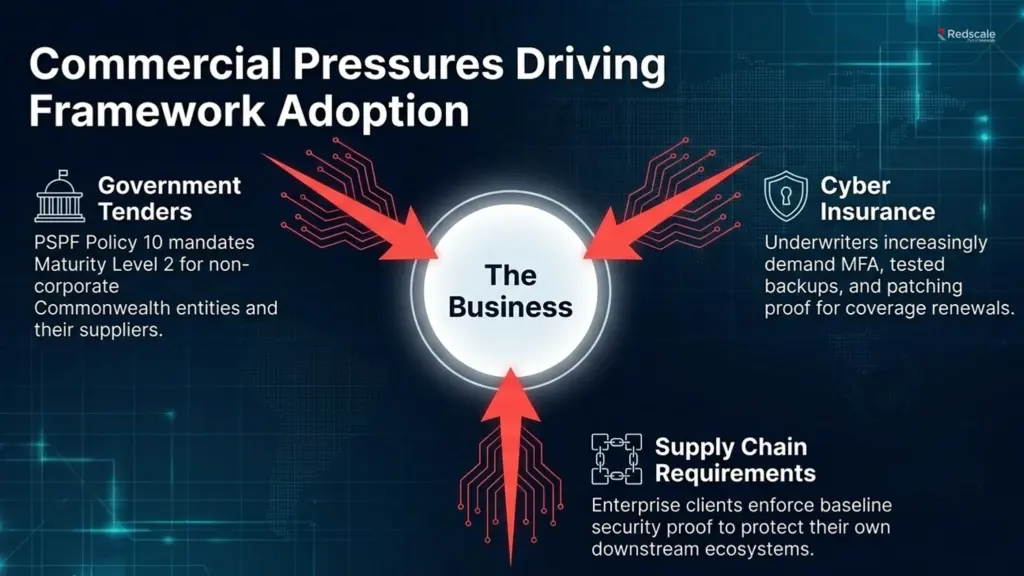
The Essential 8 is mandatory for relevant Australian Government entities, but it is not a blanket legal requirement for every private Australian business. So the honest answer is it depends on who you are.
PSPF guidance requires non-corporate Commonwealth entities to implement Essential Eight Maturity Level Two mitigations to achieve a PSPF maturity rating of “Managing”.
For private businesses, the requirement usually arrives through customer contracts, supplier questionnaires, tender conditions, cyber insurance reviews, board risk programs, or sector expectations.
ASD also states that independent certification is not required unless a government directive, policy, regulator, or contractual arrangement requires it.
However, ‘not legally mandatory’ does not always mean ‘optional in practice’. A business may still need Essential Eight alignment to win work, renew cover, or satisfy a customer.
Does Cyber Insurance Require the Essential 8?
Cyber insurance does not universally require formal Essential Eight compliance, but insurers often ask about controls that overlap with it. These usually include MFA, tested backups, patching, endpoint security, privileged access, incident response, and security awareness.
The wording may not say ‘Essential 8’, but it may ask whether MFA is enforced, backups are tested, or vulnerabilities are patched within a defined timeframe.
Stronger controls can support insurance conversations, but they do not guarantee coverage, lower premiums, or approval.
Is the Essential 8 Required for Tenders?
The Essential 8 may be required, or strongly favoured, in tenders involving government clients, sensitive data, or higher-risk supplier relationships.
Australian Government procurement guidance says organisations must consider and manage security risks, including cyber security risk, when buying goods and services.
But not every tender asks for the same thing. One tender may ask for Essential Eight alignment, another may refer to the ISM, and another may use a supplier security questionnaire.
If you can explain your maturity level and provide evidence, your business has a clearer answer when the deadline is close.
Essential 8 and SMB1001: Which One to Start With
Essential 8 and SMB1001 are different pathways, so the right starting point depends on business size, buyer pressure, and need for certification proof.
The Essential Eight is an ASD mitigation framework, while DSI describes SMB1001 as a multi-tiered cybersecurity certification standard for small and medium-sized businesses. A better comparison is to ask what you are really looking for: control maturity, certification proof, or both.
| Buyer question | Essential Eight | SMB1001 |
| Best for | Control maturity across eight strategies | Staged cyber maturity certification |
| Progress model | Maturity Level Zero to Three | Multi-tier certification pathway |
| Proof type | Security control maturity | Structured cyber maturity |
| Start here when | Customers or contracts ask for Essential Eight | The business needs a clearer staged path |
SMB1001 is more approachable for many smaller businesses because it helps sequence maturity when internal security ownership is limited.
For businesses selling into government, enterprise, defence-adjacent, critical infrastructure, or sensitive data environments, Essential Eight alignment may need to be addressed more directly.
Both can be useful. SMB1001 can help build structure and certification evidence, while the Essential Eight can answer specific control maturity questions.
How Does an Australian Small Business Implement the Essential 8?
An Australian small business implements the Essential 8 by assessing where it stands, choosing a target maturity level, closing the highest-risk gaps, and maintaining evidence over time.
ASD recommends identifying a suitable target maturity level, then progressively implementing each level until that target is achieved.
In practice, the first step is to turn that target into a clear review of all eight strategies:
- Find the weakest control first: Most businesses will find at least one weak area. That is useful because it shows where to focus before spending time on lower-risk improvements.
- Choose a realistic first target: For many small businesses, Maturity Level One is a practical starting point before moving into deeper control maturity.
- Prioritise quick risk reduction: Start with controls that usually reduce risk quickly, such as MFA, tested backups, admin access, and patching.
- Plan the harder controls properly: Application control and more mature patching routines may take longer because they need clearer ownership, user impact planning, and ongoing review.
Do Australian Small Businesses Need a Managed Service for the Essential 8?
Australian small businesses do not strictly need a managed service for the Essential 8, but many find it the most reliable way to keep the framework running.
But the hardest part of the Essential Eight is the upkeep. So, we need to come down to the next question: do you have the internal time and expertise to keep every control healthy, day in and day out?
For example, patching needs review, backups need testing, MFA needs coverage checks, admin access needs expiry, and evidence needs to stay current.
A self-managed approach can work with skilled internal ownership, good device visibility, clear access processes, backup testing, and time to maintain evidence.
A managed approach helps when the business faces rapid growth, customer questionnaires, insurance pressure, tenders, or no clear control owner.
ASD’s guidance on engaging managed service providers recommends setting cyber security expectations upfront, asking providers for evidence of their ability to meet requirements, and including security guidance such as the Essential Eight in contracts.
There is also a business case for managed security when internal teams cannot maintain detection, response, and control evidence consistently.
IBM’s 2025 Cost of a Data Breach Report links lower global breach costs to faster identification and containment, which supports the value of clearer security monitoring, response ownership, and control maintenance.
For reference, use this table to decide where managed security support may help most:
| If this is happening | Managed security may help because |
| Patches are delayed | Remediation needs ownership |
| Admin access is informal | Privilege needs review and expiry |
| MFA is uneven | Coverage needs verification |
| Backups are untested | Recovery needs proof |
| Tenders ask for cyber evidence | Records need to be prepared early |
Get Your Business Cybersecurity Managed With RedScale
For most small business owners, the hardest question is working out whether they even need to comply, to what level, and how to keep it maintained once it is in place.
Pile on the conflicting signals from insurers, tenders, and clients, and the decision gets genuinely murky. Therefore, Redscale clears that up.
Redscale offers managed security services to help assess where your business sits today, recommends a sensible maturity target, and then takes on the day-to-day work of keeping your controls in shape. That covers the patching, monitoring, backup testing, and access management the Essential Eight runs on.
What you end up with is a clear plan and a maintained security posture, without the weight of it landing on your internal team.
Talk to Redscale today and get a straight answer about your Essential 8 obligations.